
What Are the Hardware Requirements for AI Video Models?
A Beginner's Guide to Running AI Video Generation Locally
In 2026, you can generate AI videos right on your own computer — no cloud subscription needed. But can YOUR computer handle it? This guide breaks down exactly what hardware you need, model by model, with real-world benchmarks from the community.
14+ Open-Source Models
From 6GB VRAM
800+ Reddit Data Points
Before You Start: Key Concepts Explained
AI video generation involves some technical terms. Here's what they actually mean — no jargon, just plain English.
VRAM (Video Memory)
Your kitchen counter spaceVRAM is the dedicated memory on your graphics card. Think of it as your kitchen counter — the AI model is your ingredients, and they all need to fit on the counter at the same time to cook. More VRAM = bigger models = better quality videos. This is completely separate from your regular RAM.
Check yours: Task Manager → Performance → GPU → Dedicated GPU Memory
RAM (System Memory)
Your pantry shelfRAM is your computer's main memory (the sticks on your motherboard). When your VRAM counter is too small, overflow ingredients get stored here. It works, but grabbing items from the pantry is slower than having them on the counter.
32GB minimum for AI video. 48-64GB recommended.
Quantization (GGUF / FP8)
Compressing a photo to JPEGQuantization shrinks a huge AI model to fit on smaller GPUs — similar to saving a RAW photo as JPEG. The file gets much smaller with only a slight quality drop. GGUF Q4 cuts a 28GB model down to ~8GB. FP8 halves it to ~14GB.
GGUF = most flexible, works on any GPU. FP8 = faster on RTX 40/50 series.
LoRA (Low-Rank Adaptation)
An Instagram filter for your AI modelLoRAs are tiny add-on files (usually 200-600MB) that modify how a model behaves — changing its style, speeding it up, or teaching it new tricks. Lightning LoRAs can cut generation time by 70% by reducing the number of steps needed.
Speed LoRAs (Lightning, CausVid) are game-changers for slow GPUs.
Steps (Inference Steps)
Sketch → Rough draft → Final paintingEach step refines the video a little more. More steps = sharper details but longer wait. A 20-step generation takes 4x longer than a 5-step one. Speed LoRAs let you get good results in just 4-5 steps instead of 20.
Start with 4-8 steps using a speed LoRA. Only increase if quality matters more than time.
ComfyUI
The workshop where it all happensComfyUI is the most popular tool for running AI video models locally. It's a free, open-source program with a drag-and-drop node interface. You download models, connect nodes, and hit Generate. Most community workflows and tutorials are built for ComfyUI.
Free download at github.com/comfyanonymous/ComfyUI
VRAM Tiers: What Can Your GPU Run?
Your GPU's VRAM is the single most important factor. Here's exactly what you can run at each tier — based on real-world community testing, not marketing specs.
GPUs
RTX 3090 · RTX 4090
Resolution
720p-1080p
Speed
50s-4 min per 5s clip
Compatible Models
Nearly everything — WAN 14B (FP8) · LTX 2.3 · HunyuanVideo 1.5 · Mochi 1 · SkyReels V3 · CogVideoX-5B
The 2026 gold standard. At 24GB, you never have to choose between models — they all fit. FP8 runs natively, quality stays high, and you can generate 720p without tricks. This is the tier the community universally recommends.
"The RTX 4090 remains the king of local video generation" — GPU benchmarks with 199 upvotes
Generated with just 4GB VRAM and 16GB RAM
2026 Open-Source AI Video Models: The Complete Landscape
There are now over 14 open-source video models you can run locally. Here's the full picture — what each does best, and what hardware it needs.
The Big Three
The most capable, most tested, and most community-supported models in 2026.
WAN 2.2
AlibabaThe Quality King
Best photorealism and human motion. Mixture-of-Experts architecture with separate high-noise and low-noise experts. Largest community ecosystem with the most LoRAs, workflows, and tutorials.
Min VRAM
6GB (GGUF Q4)
Recommended
24GB
Speed (5s/720p)
50s-4min
Quality
9/10
LTX 2.3
LightricksThe Speed Demon
Fastest generation by far — near real-time on a 4090. Supports text-to-video, image-to-video, and native audio sync. Apache 2.0 license. Fast Flow and Pro Flow modes.
Min VRAM
8GB (quantized)
Recommended
24-32GB
Speed (5s/720p)
<30s
Quality
8/10
HunyuanVideo 1.5
TencentThe Physics Engine
Most natural motion and physics — water, smoke, fabric all move believably. v1.5 trimmed parameters from 13B to 8.3B and dropped VRAM from 47GB to 14GB with offloading.
Min VRAM
14GB (offload)
Recommended
24GB
Speed (5s/720p)
3-5min
Quality
8/10
Rising Stars
Newer models pushing boundaries in unique directions.
FramePack
6GBThe VRAM Miracle · Stanford (Lvmin Zhang)
From the creator of ControlNet. Revolutionary frame compression lets you run 13B models on 6GB VRAM. Generates frame-by-frame, so video length doesn't increase VRAM usage.
DaVinci MagiHuman
6GB (block swap)Video + Audio Together · SII-GAIR & Sand.ai
Single-stream Transformer that generates video AND audio simultaneously. 40-layer architecture with shared parameters across all modalities. 5s 1080p in 38s on H100.
CogVideoX-5B
8GB (FP8)Best Image-to-Video · Tsinghua / Zhipu AI
Best prompt adherence among open models. Generate a hero image with Flux, then animate it with CogVideoX. 3D Causal VAE for efficient compression.
Mochi 1
20GB (FP8)Most Natural Motion · Genmo AI
Asymmetric Diffusion Transformer produces the most natural motion physics of any open model. Water flows with genuine turbulence, fabric ripples naturally. Apache 2.0 license.
SkyReels V3
24GBMulti-Modal Cinema · Skywork AI
Built on WAN 2.1 architecture with multi-subject generation from reference images and audio-driven video. V4 (preview) adds simultaneous video+audio at 1080p/32FPS.
Beginner-Friendly
Start here if you have limited hardware or are brand new to AI video.
WAN 1.3B
The lightest way into WAN's ecosystem. Quality is lower but it runs on almost anything.
LTX-Video 2B
Ultra-fast lightweight variant. Great for learning ComfyUI workflows without waiting forever.
AnimateDiff
Plugs into Stable Diffusion. Your favorite checkpoints and LoRAs still work — it just adds motion.
WAN VACE
All-in-one: generate, edit, inpaint, style transfer. If you only install one model, this might be it.
The Hidden Bottleneck: RAM & Storage
VRAM gets all the attention, but insufficient RAM or slow storage can silently kill your performance.
System RAM: More Than You Think
Constant crashes and out-of-memory errors. ComfyUI will struggle to keep models loaded.
Works for GGUF Q4 models. You'll hit limits with larger models or multiple workflows.
The sweet spot for most users. FP8 models with CPU offloading run smoothly.
Run any model configuration without worrying about memory. Future-proof for larger models.
"I upgraded to 48 GB. It makes a huge difference" — Reddit user running LTX-2 on RTX 3060 12GB
Windows Page File Trick
Low on RAM? Set Windows virtual memory to 40-50GB. It uses your SSD as emergency RAM — slower, but prevents crashes. Just know it wears your SSD faster over time.
Storage: NVMe SSD Required
AI video models are large — a single model can be 8-28GB. A collection easily exceeds 100GB. Use an NVMe SSD — loading models from a hard drive adds minutes to every generation. Budget at least 500GB of fast storage for models alone.
No Upgrade Budget? Squeeze More From Your Hardware
These community-tested techniques can dramatically improve your experience without spending a dime.
GGUF Quantization
Cuts VRAM 50-80%The #1 technique for low-VRAM users. Compresses a 28GB model to 8GB (Q4) with minimal quality loss. Essential for 8-12GB GPUs.
Trap: GGUF is slower than FP8 on RTX 40/50 series due to missing hardware acceleration. Only use GGUF if your model doesn't fit in VRAM otherwise.
Speed LoRAs (Lightning / CausVid)
Reduces time 60-70%Lightning LoRAs cut inference steps from 20 to 4-5. A 15-minute generation becomes 5 minutes. Rank 64 versions preserve motion quality better than Rank 32.
SageAttention 2
10-20% fasterDrop-in attention optimization. Install it, enable it, enjoy free speed. Radial-Sage Attention (newest) adds another 20% on top: 74 sec vs 95 sec in benchmarks.
Generate Low, Upscale Later
3-5x fasterGenerate at 480p, then upscale to 720p or 1080p using Topaz or SeedVR2. Results are nearly indistinguishable from native high-res, at a fraction of the time.
Torch Compile
Free speed boostOne-line flag that optimizes model execution. Zero quality loss, noticeable speed improvement. Requires PyTorch 2.8+.
FP16 Accumulation (RTX 40/50)
~20% fasterHardware-accelerated optimization exclusive to RTX 40/50 series. Adds ~20% speed with ~5% quality trade-off. Enable with --fast fp16_accumulation flag.
Buy a GPU or Rent Cloud?
There's no universal answer — it depends on how much you'll use it.
Buy Your Own GPU
Pros
No per-hour cost — generate whenever you want
Zero latency — no upload/download waiting
Full privacy — nothing leaves your machine
Useful for other tasks (gaming, other AI work)
Cons
High upfront cost ($750-$2,500+)
Electricity costs add up
Hardware depreciates as new GPUs release
Used RTX 3090
24GB VRAM · Best value-per-VRAM in 2026
RTX 5060 Ti
16GB VRAM · Budget new card with FP4 support
RTX 5090
32GB VRAM · Best consumer GPU, 50% faster than 4090
Rent Cloud GPUs
Pros
No upfront investment
Access top-tier hardware (5090, A100, H100)
Scale up or down as needed
Try before you buy — test hardware before committing
Cons
Ongoing costs add up over time
Upload/download latency for files
Depends on internet connection
RunPod
Most popular, great ecosystem
Vast.ai
Cheapest, variable quality
ComfyUI Cloud
Zero setup, ready to use
Modal
Great for light/occasional use
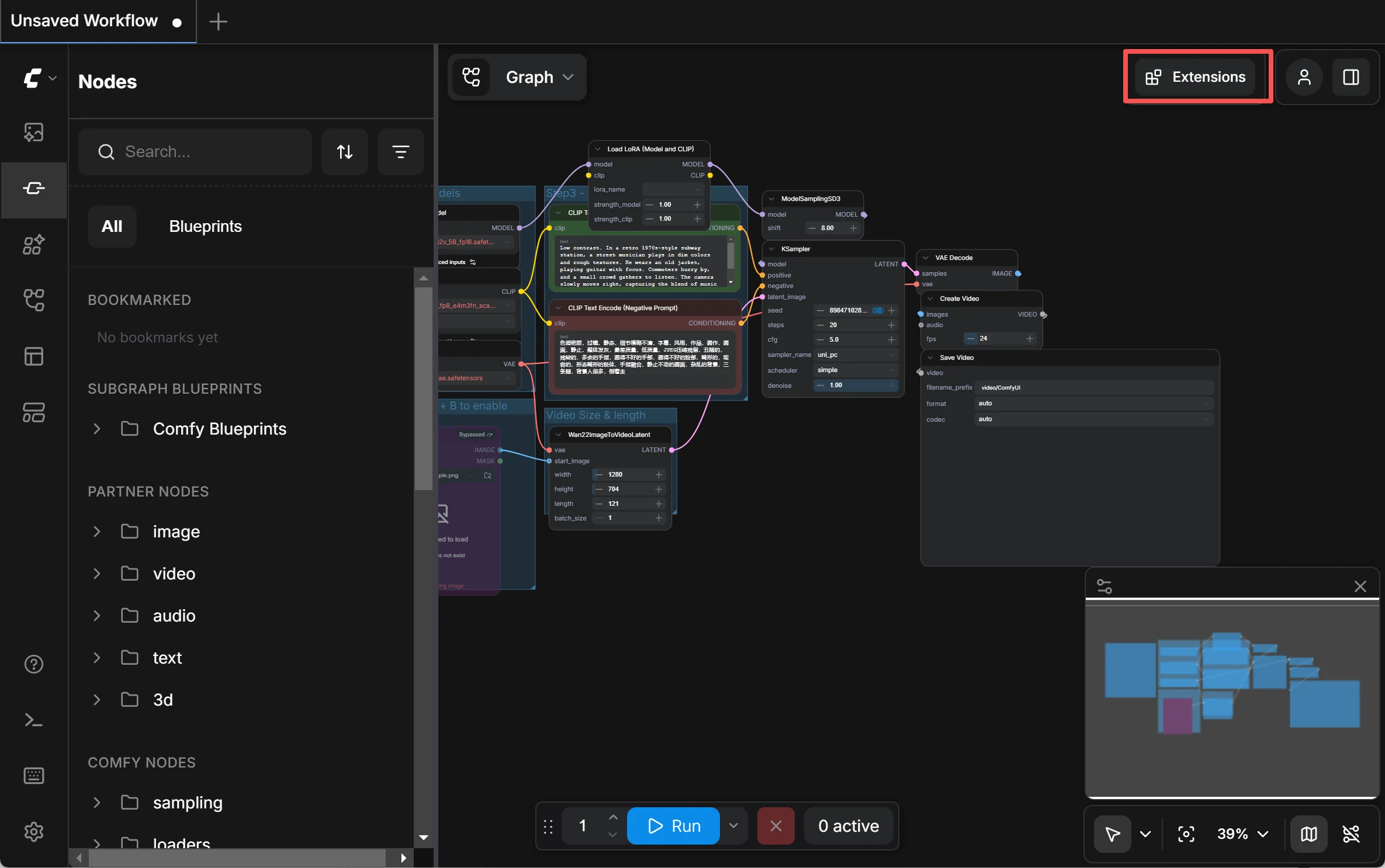
ComfyUI — the most popular open-source tool for running AI video models locally
The Break-Even Point
At 15 hours per week, RunPod costs ~$500/year. A used RTX 3090 costs $750 once. If you'll use it for more than 18 months, buying wins. If you're just experimenting, rent first — then buy once you're hooked.
Recommended Builds for AI Video
Three budget tiers with specific parts and what they can do.
Entry Build
~$600-800Run every major model at FP8. 720p generation in 2-6 minutes. The best value build you can get.
Mid-Range Build
~$1,200-1,500The community standard. 720p in under 2 minutes. 1080p possible with tricks. Run multiple models without swapping.
Future-Proof Build
~$2,500+No compromises. Full precision models, 1080p native, sub-60-second generation. FP4 hardware acceleration. Ready for next-gen models.
Apple Silicon Alternative
Mac Studio with M3/M4 Ultra (up to 512GB unified memory) can run large models that don't fit on consumer GPUs. Trade-off: slower bandwidth (400-800 GB/s vs 3,350 GB/s on H100) means generation is 2-3x slower per step.
Frequently Asked Questions
Skip the Hardware Headache
Don't want to worry about VRAM, drivers, and compatibility? Try our online AI video generator — no GPU required. Free trial with registration, no content review, instant results.
No GPU Needed
Runs on our servers — works on any device
Free Trial
Sign up and start generating immediately
No Content Review
Your creations are private and unrestricted
Multiple Models
Access top models without downloading anything